iPhone · Apple Watch

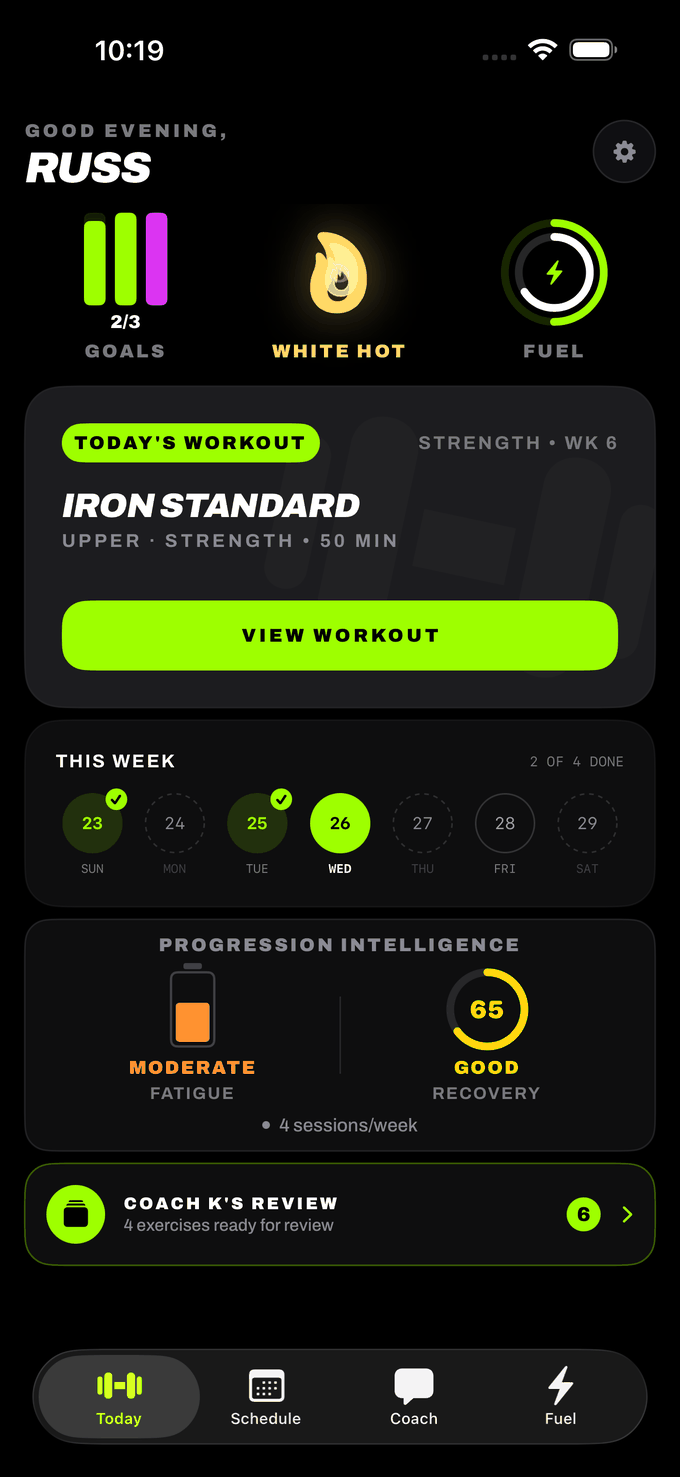
WEEK 6 OF A
STRENGTH BLOCK.
NOT WORKOUT #47.

Kinetics builds a periodized program around your gym, your schedule and what you actually lifted last week — then coaches you through every set of it. You always know where you are in the block, and why today looks the way it does.

Download on the App Store

Free to download. Pro is $4.99/month or $49.99/year, and both start with a 7-day free trial.
Coach K

He Remembers The Session, Not Just The Number

Every finished workout is distilled into what actually happened — the lift you swapped out, the set you cut short, the day you finished twenty minutes early, the movement you rated down twice. That record is in front of him the next time you talk — the post-workout note, the question you ask mid-set. And what you rated down twice doesn't come back: two thumbs-down and the app pulls that movement out of your plan and out of workouts already on your calendar.

He cites the date

Post-workout notes reference where a specific lift was weeks ago, not a generic "great job."

Thumbs down twice and it's gone

Rate a movement down two sessions running and it stops appearing. Excluded lifts are stripped before a session ever reaches you.

Talk to him mid-set

Ask for a lighter top set, a different lift, or why today's rest is 150 seconds. His answer applies to the session you're standing in.

Example coach note
K

Your last two bench sessions both ended at 185, and the final set was slower each time. We're holding 185 today and adding a set instead of weight.

You've swapped out the pec deck three weeks running, so it's off the list. Cable fly in its place.

Swaps
remembered
Ratings
acted on
PRs
tracked
Periodization

You Can See The Whole Block

Most apps hand you a workout. Kinetics hands you a position in a plan. Each phase has its own set and rep character, its own rest, its own effort range — and the app tells you which one you're in, which week of it, and what comes next. Foundation runs once, to calibrate. After that the cycle repeats.

FOUNDATION
1 week · calibration
Sets × Reps
2 × 10
Rest
60s
Effort
RPE 6–7
Done
HYPERTROPHY
3 weeks
Sets × Reps
3 × 10
Rest
75s
Effort
RPE 7–8
Done
STRENGTH
3 weeks
Sets × Reps
4 × 5
Rest
150s
Effort
RPE 8–9
You are here · Wk 2
ATHLETIC
2 weeks
Sets × Reps
3 × 6
Rest
105s
Effort
RPE 8–9
Next
METABOLIC
3 weeks
Sets × Reps
3 × 15
Rest
40s
Effort
RPE 7–8
Then loops

Or pin one phase

Want to sit in Hypertrophy indefinitely with a chest-and-back emphasis? Turn off the clock and stay there.

Written a week at a time

Kinetics plans the whole week's split first, then the sessions, so your pulls, pushes and hamstrings balance across the week rather than per day.

Honest session length

A 45-minute session counts the real rest between sets. Ask for 45 minutes in a Strength phase and you get fewer exercises, not a session that secretly runs 70.

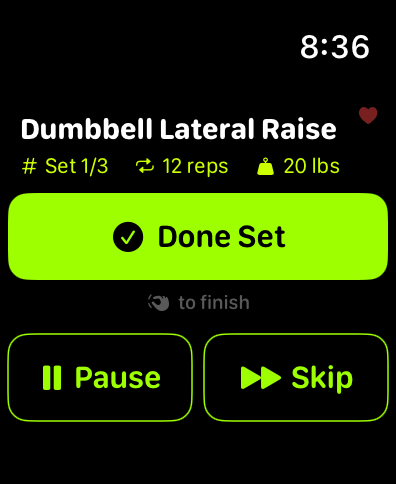
The Kinetics Watch screen mid-workout: dumbbell lateral raise, set 1 of 3, 12 reps at 20 lbs, with Done Set, Pause and Skip

The Kinetics Watch screen mid-set. The pinch hint under the button appears on watches that support double-tap.

Apple Watch

Start It On Your Phone. Run It From Your Wrist.

Hit start and the Watch app comes up on its own. The set you're on, the weight, the reps, the rest clock and your heart rate are all on your wrist from there — so for a normal session in the gym, that's the last time you pick the phone up.

Double-tap between sets

Pinch your finger and thumb twice to finish the set, skip the rest, or start and stop a timed hold. Chalk, gloves, a loaded bar — nothing has to touch a screen.

Needs watchOS 11 and an Apple Watch Series 9, Ultra 2 or newer. On older watches it's a button on the same screen.

The rest clock runs on the watch

It counts down on the Watch itself instead of waiting on your phone to push every second, and taps your wrist through the last five. You look up when the set starts, not thirty seconds after.

Your phone is always the source of truth

The Watch tells your phone what you did; it never sends a copy of your log back. So a stale watch can't overwrite sets you've already recorded — the most common way a lifting app loses your work.

Heart rate while you lift

Live BPM on your wrist, written to Apple Health, and folded into the intensity breakdown on your post-workout report.

Look away, come back, keep going

Pause, skip and the full exercise list are all on the wrist. Reopen the app mid-workout and it lands on the exact set you're standing on.

What it doesn't do

The Watch works with your phone, not instead of it. Keep the phone in the room — taps sent while it's out of range for more than a minute don't make it back. The Watch moves you through the sets at the prescribed reps and weight; changing a number is still a phone job. Auto-launch needs permission to write workouts to Apple Health.

Hands-Free

Put The Phone Down

Chalk on your hands, a bar to load, forty-five seconds of rest left. You should not have to unlock a phone to find out what's next.

He calls the next set out loud

At the top of every rest, your next exercise, weight and reps are spoken aloud, so you can load the bar while the clock runs.

Nod twice to log a set

With AirPods in, a double-nod completes the set. Sensitivity is adjustable and there's a guided calibration.

A spoken brief before you start

Coach K walks you into the session and names what you're working on today, in his voice, before the first rep.

Both hands-free features are off by default. Settings › Audio Cues and Settings › Hands-Free.

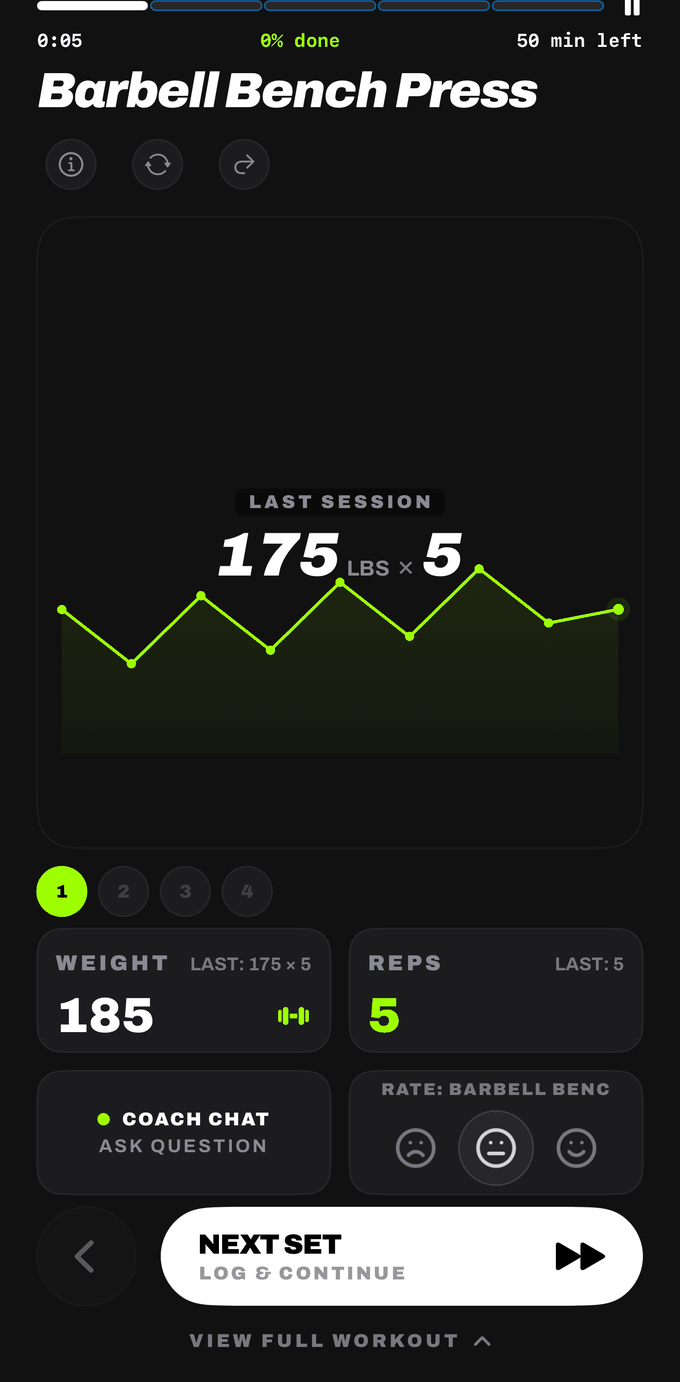
A Kinetics workout screen mid-set: barbell bench press at 185 for 5, with last session's numbers and the progression chart
Your Gym

It Only Programs What You Can Actually Reach

Not "machines" and "cardio equipment." Lat pulldown, leg press, hack squat, pec deck, leg curl, rower, SkiErg — named, so a session never asks you for a piece of kit that isn't in the building.

More than one gym

Save separate profiles for the commercial gym, the garage rack and the hotel. Switch and the programming follows.

490+ exercises

Filter the whole library by muscle group, difficulty, or just My Gear. Every entry carries form notes and its equipment requirement.

Swap mid-workout

Rack taken? Replace any lift with a same-muscle alternative you have gear for. Sets, reps, weight and rest carry over.

Travel days

Mark the days you're away. The week gets scheduled around them and your streak pauses rather than breaking.

After The Session

A Debrief, Not A Confetti Screen

Sets, reps, total volume, intensity, muscle activation, heart-rate range, and every personal record with the estimated one-rep-max change next to it. Then the volume trend, so you can see whether the block is doing what it's supposed to do.

Plateau Breaker

Spots a lift that hasn't moved in three weeks, flags it, and offers a one-tap weight bump or rep progression.

Coach K's Read

A weekly written take on your last eight weeks, with every metric tappable down to the chart underneath it.

A readiness score you can actually read

Sleep, HRV and resting heart rate come in from Apple Health and score your readiness, with sub-scores so you know which one is dragging. It's a reading you act on — you decide whether to push or back off. Your training load and how you rated recent sessions are what feed the next week's plan.

Deloads when you've earned one

Six sessions in seven days, or a run of workouts you rated brutal, and Coach K writes the next one lighter — roughly 10–20% off the weights and about a third fewer sets. Triggered by how training is actually going, not a recovery week pencilled into the calendar.

Session report
47
Min
18
Sets
96
Reps
3
PRs
ChestPrimary
TricepsSecondary
Front deltsSecondary
Heart rate avg 128 · max 164 · min 71 bpm
On Your Phone

No Spinner Between You And The Bar

Your program, your history and every set you log live on the device. Logging doesn't wait on the gym wifi, and there is no account to make.

No sign-up

No email, no password, no profile on a server somewhere. Open it and start.

No trackers

No advertising SDKs, no analytics SDKs, nothing sold. Full detail in the privacy policy.

Where the network is needed

Writing your week, answering you mid-workout and reading a meal photo need a connection. Training and logging don't.

Fuel

Photograph The Plate, Move On

Snap a meal or type a line of description and get calories and macros back without hunting through a database. Daily protein, carb and fat targets, with what's left in the day always visible.

1.

Snap or type

A photo, or a sentence. Either works.

2.

Check the estimate

Calories and macros come back as an estimate you can adjust.

3.

See it against your training

Calories and protein tracked next to the week you're actually lifting.

Pricing

Free To Start. Cheap To Keep.

Download it, look around, browse the whole exercise library. Building your program and talking to Coach K are Pro.

Monthly
$4.99
per month
7-day free trial.
Annual
$49.99
per year
7-day free trial. Works out to $4.17 a month.

Subscriptions renew automatically unless cancelled at least 24 hours before the period ends. Manage or cancel in your Apple ID settings. Anything that's free today stays free.

Start The Block

Tell Kinetics what's in your gym, how many days you train and how long you've got. It writes the week.

Get Kinetics on iPhone

Requires iPhone. Apple Watch app included.